Join a public jam session
The gist in 10 seconds
- Jam sessions, in the menu: public rooms run by Jamodio, by style (blues, jazz, rock), open to all, free.
- Before entering, you see who is playing, how many seats are left (6 musicians max), and the latency measured from where you are.
- One click on Join: same studio, same console, same bubble. No camera, no recording, no Library: you play.
- The Audio Engine is required, as everywhere. On Free, a jam does not use up your 30 minutes of the day.
The rooms
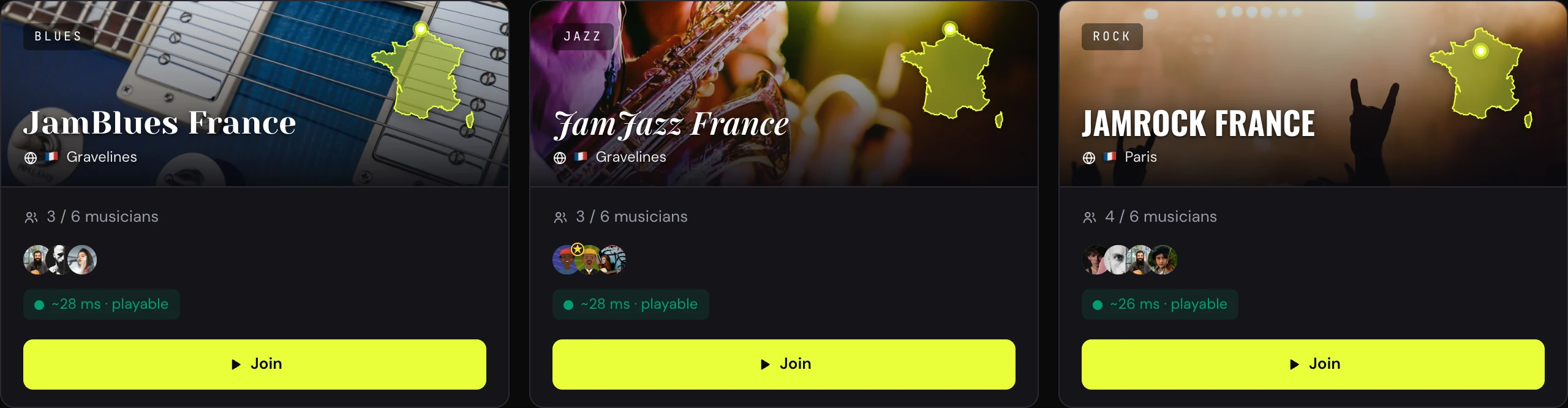
The rooms — style, server, seats, latency from where you are
1
Open Jam sessions
In the app menu. Each card is a room: its style, its server (“Gravelines”, “Paris”), the musicians present with their avatars, and “N / 6 musicians”.
2
Look at the latency from where you are
Jamodio measures the trip to each room's server, live: “Measuring latency…” then “Latency ~28 ms”, for example. That is what you will find in your bubble once inside, plus the others' trip. Beyond a certain latency, a room does not open from your location: the card says so (“Closed from your location”).
3
Sort, choose
Sort by style, country, latency or attendance; grid or list view. A “full” room waits for a seat to free up.
4
Join
Join: the studio door checks that your Audio Engine is running, then you enter the console, with your MY SEND strip and one strip per musician. Set your send as usual → First settings of your strip.
5
Talk, listen, play
The ON AIR talkback to say hello and suggest a song; the chat for the chart. The others hear you as you hear them, with everyone's bubble to know where each millisecond comes from.
What a jam does not have, on purpose.
No camera (audio first), no recording, no Library, and nothing is saved at the end: a jam is the moment. To record a take or present a chart, that is a private studio. The rooms are run by Jamodio: you do not create your own public jam. Servers are in France for now; a server opens on request from a region's musicians, write to us.
No camera (audio first), no recording, no Library, and nothing is saved at the end: a jam is the moment. To record a take or present a chart, that is a private studio. The rooms are run by Jamodio: you do not create your own public jam. Servers are in France for now; a server opens on request from a region's musicians, write to us.
If it does not work
- The card says “Closed from your location”: this room does not open from where you are. An Ethernet cable rarely shortens the distance, but it stabilises; otherwise, try a room on another server, or ask us for a server near you.
- “full”: six musicians is the maximum. Come back a little later, or pick another room.
- The door asks for the Audio Engine: as in a private studio. Install it or launch it → Install the Audio Engine.
- You want to keep a trace: not in a jam. Invite the musicians you met into your studio, through the Community → Find musicians.
Still stuck? Write to support@jamodio.com: we reply within 24 hours.