Reading your latency bubble
- Under each musician on the console, a button: bars (the health of the link) and a figure (“21+ms”).
- Hover it, or tap it: the bubble opens. “At least 21 ms” is what Jamodio measures, from the other person's gesture to your ear.
- It breaks the figure down: Network, Buffer, Audio. And, set apart, the hardware not counted.
- It concludes in plain words (“Stable link”, “Tony's network is irregular”, “Your computer is overloaded”) and says, if there is something to do, what and who.
Step 1 — Find the button
 : four bars and a figure. The bars are the health of the link with that musician. The figure is how long their playing takes to reach your headphones, at least.
Step 2 — Read the figure: “at least”
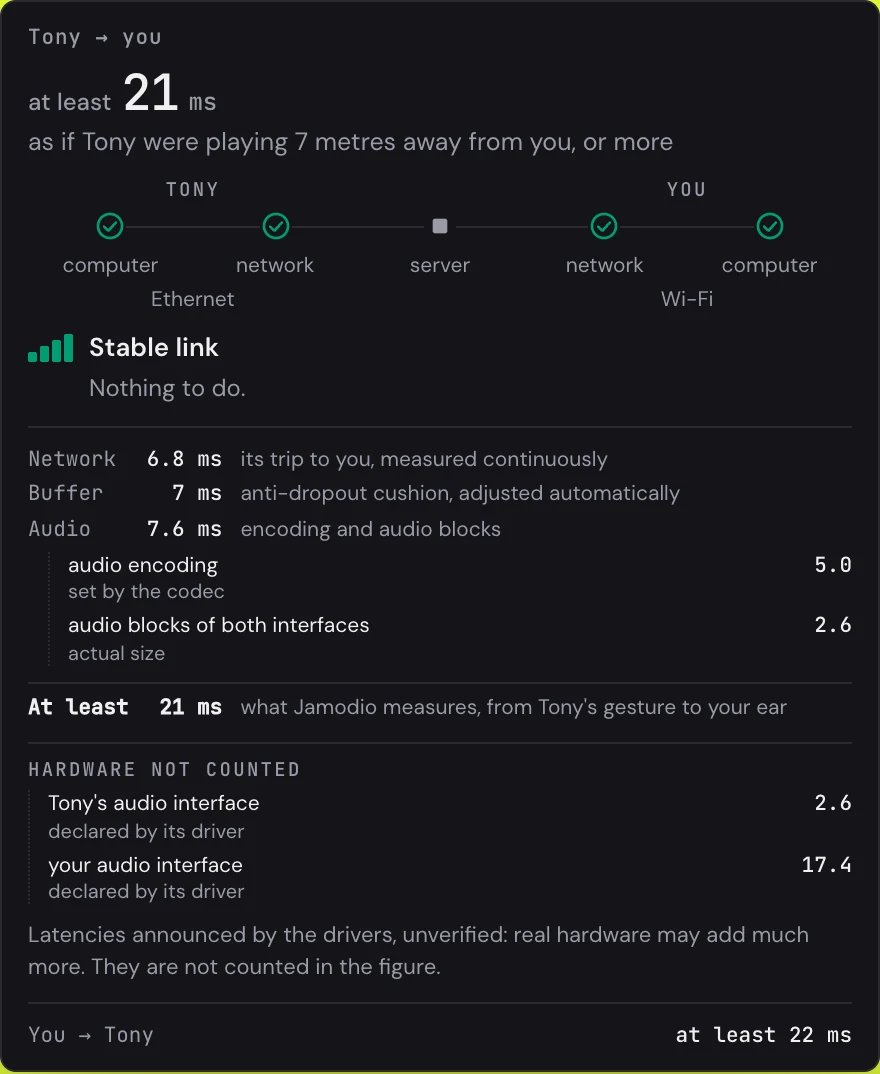
The bubble starts with the direction (“Tony → you”) and the figure: at least 21 ms. “At least”, because Jamodio only adds up what it measures. What the drivers declare without proof is shown separately, uncounted (see below).
Right under it, an equivalent in metres: “as if Tony were playing 7 metres away from you, or more”. Sound travels about 34 cm per millisecond in the air. On a stage, a bass player 7 metres from the drummer hears them with the same delay. It is a landmark, not a grade.
Step 3 — Follow the chain
Between the two names, five stages: the other person's computer, their network, the server, your network, your computer. Each stage carries a tick (“fine”) or an alert sign (“problem”). Under each network, that person's connection type: Ethernet, Wi-Fi, mobile network. It is not an alert, it is information: it explains a buffer that moves.
Step 4 — Read the verdict, and who acts
Under the chain, the bars and a sentence. When all is well: “Stable link — Nothing to do”. When something is off, the bubble names the stage, and says whether it is yours to fix or theirs.
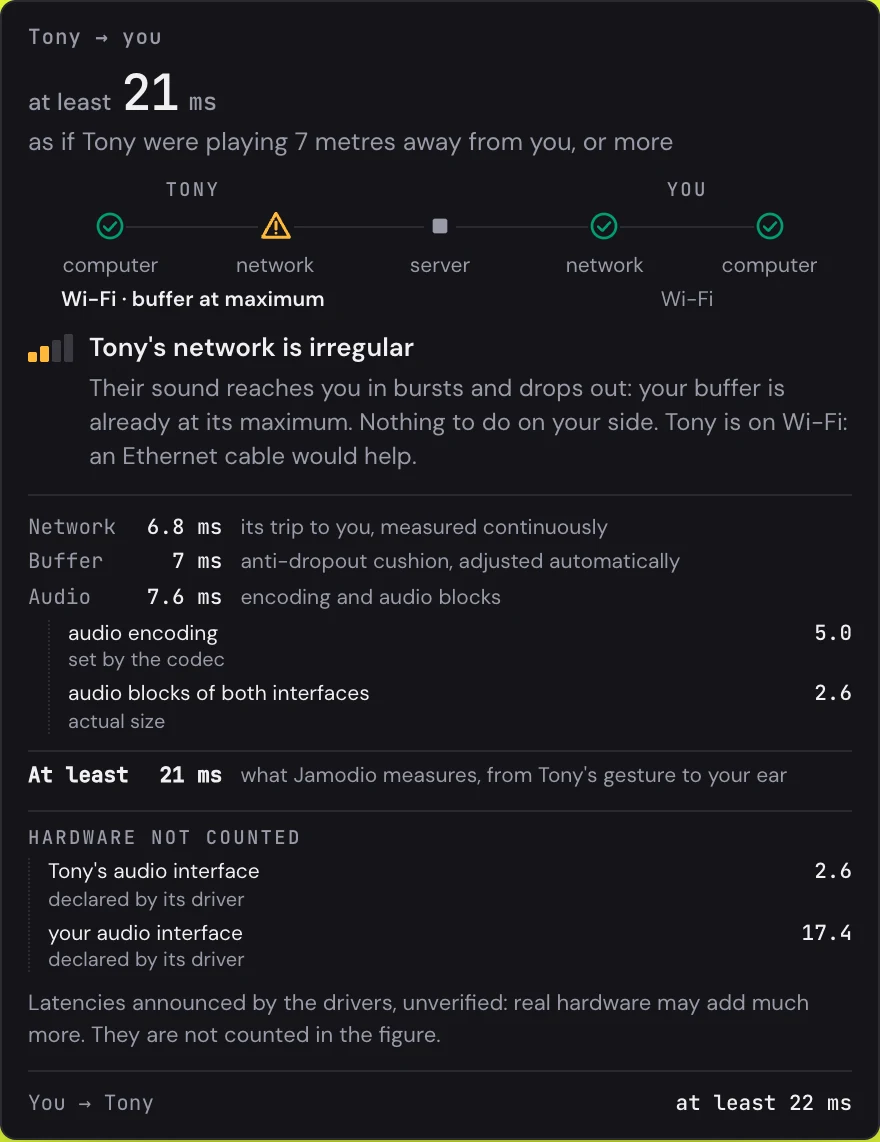
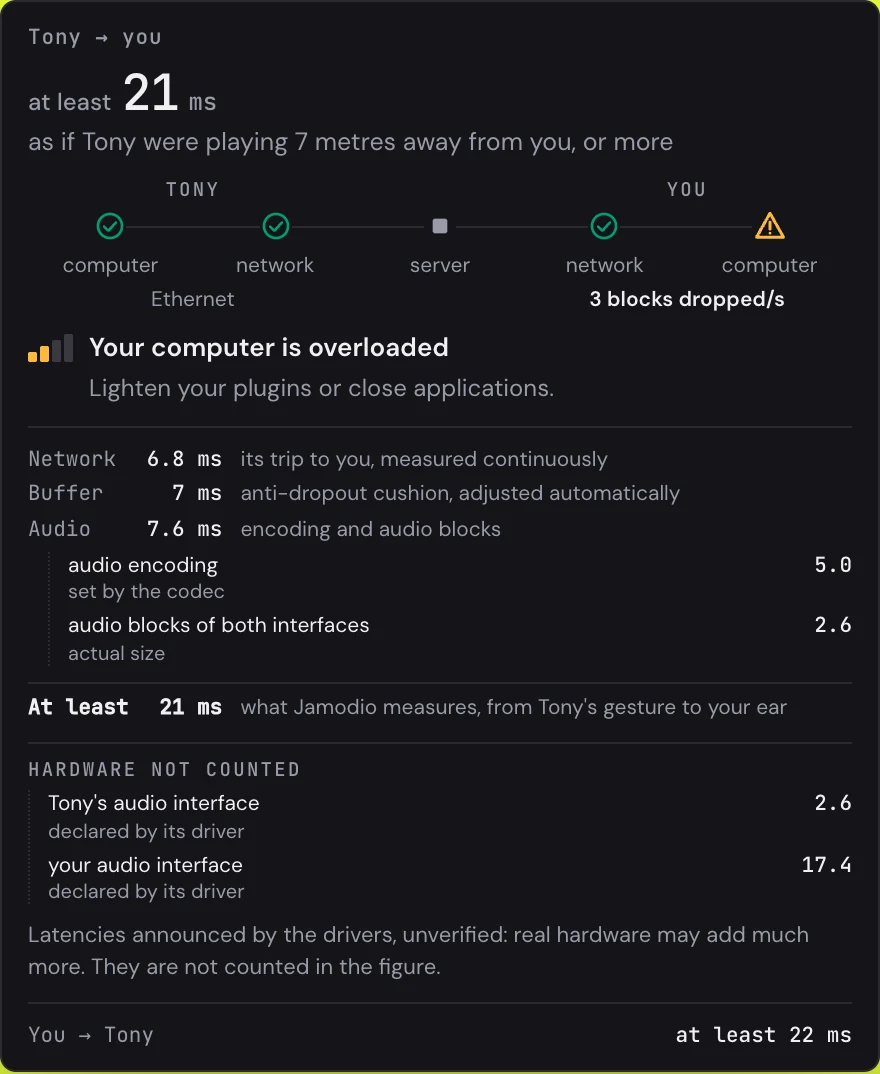
| What the bubble says | What it means | Who acts |
|---|---|---|
| Stable link | Sound arrives regularly. Nothing to do. | Nobody |
| Tony's network is irregular | Their sound reaches you in bursts and drops out: your buffer is already at its maximum. | Tony (an Ethernet cable, most of the time) |
| Your network is irregular | Everything you receive arrives in bursts, not only Tony. | You: Ethernet rather than Wi-Fi |
| Your network is losing packets | Pieces of sound never arrive. If you are on Wi-Fi, the bubble says so: a cable usually fixes it. | You |
| Your computer is overloaded | Your computer cannot keep up: memory full or processor busy. | You: close heavy applications, lighten your plugins |
| Tony's computer is overloaded | Their sound reaches you chopped up, and it is not the network. | Tony |
Under the verdict, a line of evidence when there is one: “jitter ≈ 12 ms”, “3 dropouts/min”, “2% lost”, “memory saturated”. That is the measurement that triggered the verdict.
Step 5 — The three detail lines
- NetworkThe trip of the other person's sound to you, measured continuously. It depends on the distance and on the path the packets take.
- BufferThe anti-dropout cushion, adjusted automatically. When the network is regular, it stays small. When sound arrives in bursts, it grows to absorb them: it is the first thing that moves when a link degrades.
- AudioThe sound encoding (set by the codec) and the audio blocks of both sound cards (their real size). Stable from one session to the next.
- At leastThe sum of the three: what Jamodio measures, from the other person's gesture to your ear.
Step 6 — “Hardware not counted” and “Avoidable”
Under a rule, the bubble lists what the drivers announce: your sound card, theirs, a built-in microphone, a plugin. These values are declared, not verified, and real hardware may add much more. So they are not counted in the figure. This is where you see, for instance, that a built-in sound card declares 17 ms where an external audio interface declares 2 or 3.
On your own bubble, an Avoidable line can appear: “12 ms come from your plugin (latency it declares): bypass removes them”, or “180 ms come from your Bluetooth output: a wired output removes them”. There, you know exactly what to unplug. See Wired headphones.
Step 7 — Your own bubble: “You → the others”
On your strip, the bubble talks about what you send. The figure is that of the slowest link among your musicians (“as if you were playing 8 metres away from Tony”), the chain reads the other way round, and at the bottom, one line per musician: “You → Tony, at least 22 ms”. Last line: Your headphone monitoring, what you hear of yourself.
Two verdicts belong to this bubble only: “Your sending is losing packets” (the others hear you chopped up) and “Your sending is irregular” (your sound leaves in bursts). In both cases, it is fixed at your end: the cable first.
Because sound takes time to travel, even in a room: 3 metres away, it arrives 9 ms later. The bubble does not tell you whether you “can” play. It tells you how much, where it comes from, and whether it is stable. The playing is up to you.
- “measuring…” instead of the figure: every stage has to be measured. A few seconds after a musician arrives, that is normal. If it lasts, the bubble says what is missing (“network being measured”, “buffer being measured”).
- “no sound” and “No sound from Tony for 8 s”: no packet arrives from them any more. Sound resumes on its own as soon as it comes back. Otherwise, ask them to leave and come back.
- “not sending” on your strip: your sound is not leaving. Check your input in Audio settings, and that your LIVE button is not cut.
- The figure keeps moving: look at the Buffer line and the connection type under each network. Wi-Fi, almost every time. Switch to Ethernet.
Still stuck? Write to support@jamodio.com with a screenshot of the bubble: we reply within 24 hours.