


NEVER PLAY ALONE.

Play with musicians,
wherever they are.

A studio to play with your band, easily, from home. A community to find people to play with. And jam sessions open to every member, for free.

The private beta is full. Opening to the public in November 2026: join the waitlist to hear about it first.

The app in
app.jamodio.com · Studio “Thursday night” · 3 musicians Audio Engine
BACKING TRACK
Backing track waveformBacking track waveform
backing-96bpm.wav03:31 / 06:55
CAMS
Thursday night96 BPM · 4/4 · Am
IntroAmFCG
VerseAmFCGAmFE7E7
ChorusFGAmAmFGCC
BridgeDmAmDmAmFGGG
Chart — Thursday night.pdf
Benoît
Lucas
Karim
CHAT
Lucas · 20:41
Back to the bridge? I’m bumping the tempo to 96.
You · 20:41
Fine by me. Karim, could you bring your send down a touch?
Karim · 20:42
Done. −3 dB. Let’s record this one.
Message the group…SEND
METRONOME
96BPM
RECORD
REC02:163 armed
The film

Jamodio in one minute.

The studio, the mixer, backing tracks, recording, the community and jams: all of Jamodio, filmed in the app. Turn the sound up.

Opening to the public on November 4. Until then, join the waitlist: your 1st month of subscription is free.
Already in beta

Musicians already play on it,
every week.

Jamodio is in private beta. The first testers have been rehearsing on it for several weeks, on macOS and Windows, and tell us what’s missing. The platform is built with them.

  • Private betaFull: all 25 seats are taken
  • macOS and WindowsOne small app to install once; your sound card does the rest
  • LaunchOpening to the public in November 2026
  • Support that answersAn email, a human reply, and a bug report sent from the app with the logs attached. During the beta, we come to you.
The studio

A mixing console,
one strip per musician.

Everything that leaves your place fits in one frame, on your strip: the captured input, the level the others receive, the effect. Everything else only adjusts your headphones. Nothing to open, nothing to look for.

  • On the left, the musicians (yellow-green frame). You and the others. Each strip carries the person’s talkback and their latency.
  • In the middle, the sources (blue frame). Backing track and metronome, shared by the whole band.
  • On the right, the output (light frame). The recording bus and the master, with your headphone output.

Opposite, left to right: your strip and a musician’s, the backing track, the master output.

Backing track, metronome, recording

The song and the tempo are synchronised for the whole band. You record the mix, or each musician on their own track, to download afterwards. Coming soon: the backing track split into stems, to cut the part you play and rehearse over the rest.
HD video, shared score, chat

One camera per musician, in high definition, to see the hands and the cues. A score from the Library presented next to the cameras. A chat for what doesn’t need to be said out loud.

Your settings wait for you

Faders, pans, loaded plugin, chosen input: everything is kept. You come back the next day, the console is as you left it.

Library

Your documents,
within reach.

Scores, tabs, chord charts, setlists, backing tracks, recorded takes, images: drop them once, they stay available at every session.

  • Preview a PDF or an image without leaving the studio.
  • Listen to a take or a backing track straight from the list.
  • Present a score next to the cameras: the whole band sees it.
  • Share a document with the band in one click.
LIBRARY
AllAudioDocsRecords
Chart — Thursday night.pdf1 page
Tab — intro.pdf1 page
Setlist — October 12.pdf1 page
backing-96bpm.wav3:58
repet_2026-09-18_MIX.opus4:12
bridge-chords.png1200 × 800
PreviewChart — Thursday night.pdf
Thursday night96 BPM · 4/4 · Am
IntroAmFCG
VerseAmFCGAmFE7E7
ChorusFGAmAmFGCC
BridgeDmAmDmAmFGGG
Present live Share
repet_2026-09-18_MIX.opus · 4:12
Talkback

Talk between takes.
The noise stays home.

Talkback is the channel for talking between songs. Your mic picks up your voice, but also the amp, the drums, the room. A noise filter lets only your voice through: the others hear it clean, and hear nothing when you’re not talking.

YOUR MIC PICKS UP■ your voice■ amp · drums · roomAINOISE FILTERon your machineTHE OTHERS HEARON AIR■ your voice, cleanand nothing when you’re not talkingYOUR MIC PICKS UP■ your voice■ amp · drums · roomAINOISE FILTERon your machineTHE OTHERS HEARON AIR■ your voice, cleanand nothing when you’re not talking
Effects & plugins

Your studio.
Your plugins.

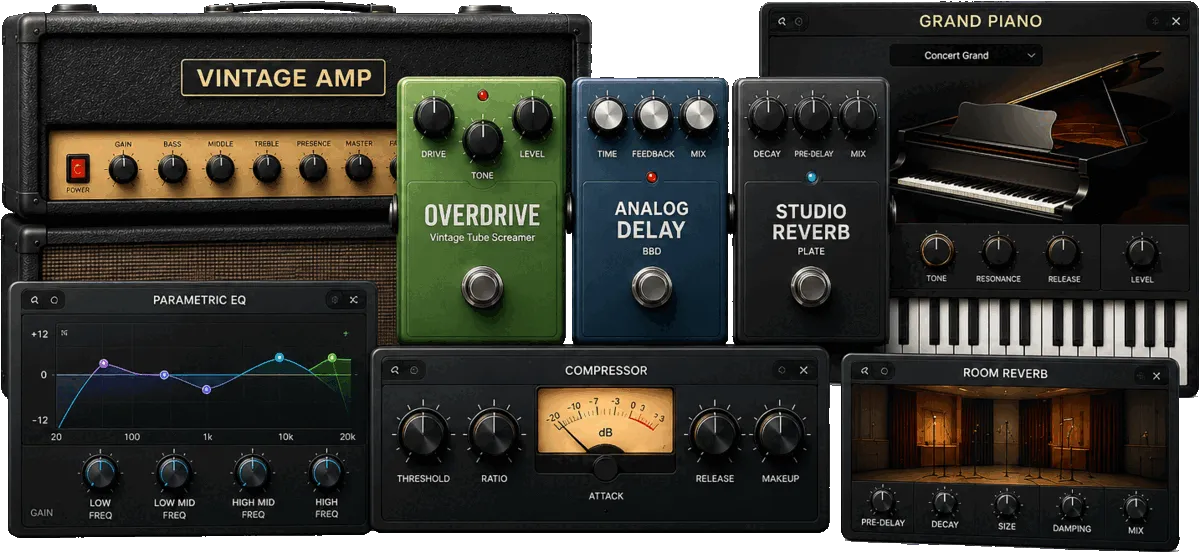
Jamodio uses the plugins already installed on your Mac (Audio Units) or your Windows PC (VST3): amp, reverb, virtual piano, MIDI drums. They slot into your strip, and the others hear the processed sound, like in a studio. Jamodio ships no plugin: you bring your own collection.

Audio plugins in Jamodio: amp, overdrive, delay, reverb, virtual piano, equaliser, compressor

Reverb on the voice

A reverb on your lead vocal for the feel of a real room. Remote backing singers hear it as is.

Amp simulation

Plug your guitar straight in: the plugin is the amp, the others hear the amp sound. Without moving yours.

MIDI piano or drums

A USB MIDI keyboard, or the virtual keyboard built into the app. The instrument plugin plays the sound, the others hear it.

  • Audio Units on macOS, VST3 on Windows: your plugins, loaded from your machine.
  • The plugin’s native window opens inside Jamodio: you adjust, you close, it’s kept.
  • A plugin that adds latency shows: the bubble displays what it costs.
Latency, no mystery

Every millisecond
has an explanation.

Hover over a strip’s number and the bubble breaks everything down: the network, the anti-dropout buffer, the encoding, the audio blocks, and the hardware that drivers declare without measuring it. With an equivalent in metres, like on a stage.

Stability counts as much as the number. A steady 40 ms is the time sound takes to cross 14 metres: the width of a big stage. And when the link varies, the bubble tells you whether it’s the network or your machine, and what to do.

Tony → you
at least21ms
as if Tony were playing 7 metres away from you, or more
Tony
You
fine
fine
server
fine
fine
computer
network
server
network
computer
Ethernet
Wi-Fi
Stable link

Nothing to do.

Network6.8 msits trip to you, measured continuouslyBuffer7 msanti-dropout cushion, adjusted automaticallyAudio7.6 msencoding and audio blocks
audio encodingset by the codec5.0audio blocks of both interfacesactual size2.6
At least21 mswhat Jamodio measures, from Tony's gesture to your ear
Hardware not counted
Tony's audio interfacedeclared by its driver2.6your audio interfacedeclared by its driver17.4

Latencies announced by the drivers, unverified: real hardware may add much more. They are not counted in the figure.

You → Tonyat least 22 ms
Tony → you
at least21ms
as if Tony were playing 7 metres away from you, or more
Tony
You
fine
problem
server
fine
fine
computer
network
server
network
computer
Wi-Fi · buffer at maximum
Wi-Fi
Tony's network is irregular

Their sound reaches you in bursts and drops out: your buffer is already at its maximum. Nothing to do on your side. Tony is on Wi-Fi: an Ethernet cable would help.

Network6.8 msits trip to you, measured continuouslyBuffer7 msanti-dropout cushion, adjusted automaticallyAudio7.6 msencoding and audio blocks
audio encodingset by the codec5.0audio blocks of both interfacesactual size2.6
At least21 mswhat Jamodio measures, from Tony's gesture to your ear
Hardware not counted
Tony's audio interfacedeclared by its driver2.6your audio interfacedeclared by its driver17.4

Latencies announced by the drivers, unverified: real hardware may add much more. They are not counted in the figure.

You → Tonyat least 22 ms
Tony → you
at least21ms
as if Tony were playing 7 metres away from you, or more
Tony
You
fine
fine
server
fine
problem
computer
network
server
network
computer
Ethernet
3 blocks dropped/s
Your computer is overloaded

Lighten your plugins or close applications.

Network6.8 msits trip to you, measured continuouslyBuffer7 msanti-dropout cushion, adjusted automaticallyAudio7.6 msencoding and audio blocks
audio encodingset by the codec5.0audio blocks of both interfacesactual size2.6
At least21 mswhat Jamodio measures, from Tony's gesture to your ear
Hardware not counted
Tony's audio interfacedeclared by its driver2.6your audio interfacedeclared by its driver17.4

Latencies announced by the drivers, unverified: real hardware may add much more. They are not counted in the figure.

You → Tonyat least 22 ms
Community

Find people to play with.

A directory of musicians, free, open once your profile is complete. Filter by instrument, style, level, distance, or keep only those available right now. Write to them. Invite them into your studio.

Twenty-four composed avatars: different hairstyles, skin tones, glasses, hats, outfits, expressions and backgrounds

Your photo, or a composed avatar: hair, skin, glasses, headwear, outfit, expression, background. Billions of combinations.

Maya Paris, France Drums Jazz Funk Drummer, looking for a trio to play weekday evenings.
Advanced Very close Ready to jam
Malik Lyon, France Bass Funk Soul / R&B Bass player for 20 years. Groove first.
Pro ~400 km away Ready to jam
Elena Berlin, Germany Violin Classical Folk Violin, from classical to folk. Looking for a guitar-violin duo.
Intermediate ~900 km away Seen today
Tom Bruxelles, Belgium Guitar Blues Rock Blues guitar, slide and bottleneck.
Advanced ~250 km away Seen today
Inès Nantes, France Vocals Pop Soul / R&B Singer, just starting out and keen to learn by playing.
Beginner ~350 km away Ready to jam
Jonas Amsterdam, Netherlands Saxophone Jazz Tenor sax. Standards and free improvisation.
Pro ~450 km away Seen today
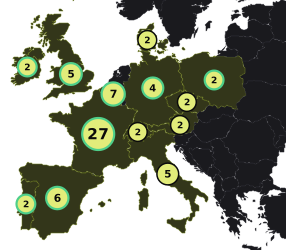
Map of Europe: number of musicians per country
  • 27 France 7 available
  • 7 Belgium +1 2 available
  • 6 Spain 1 available
  • 5 United Kingdom 1 available
  • 5 Italy
  • 4 Germany 2 available
  • 2 Portugal 1 available
  • 2 Ireland 1 available
  • 2 Switzerland
  • 2 Austria
  • 2 Czechia
  • 2 Poland 1 available
  • 2 Denmark

Messaging, and an invitation in one click.

A contact request, a conversation, and a button to invite the person into your studio. Another one to block, if needed.

MAYAParis
INVITEBLOCK
Hi! Saw your profile — you’re in Paris and you play blues?
Yes! Guitar, and some keys when needed.
Perfect. I’m looking for a trio to play on weekdays, evenings mostly. Free on Thursday?
Thursday 8pm works for me, I’ll keep the evening free.
Write your message…SEND
Public jam sessions

Open rooms,
by style.

Blues, jazz, rock: rooms run by Jamodio, open to everyone. You see who’s playing, how many seats are left and the estimated latency from your place, before you enter. One click, and you play.

Servers are in France for now. The ambition: open some in several European countries, and further. A server opens on simple request from the musicians of a region.

Blues
JamBlues France
Gravelines
3 / 6 musicians
Latency ~28 ms
Join
Jazz
JamJazz France
Gravelines
3 / 6 musicians
Latency ~28 ms
Join
Rock
JamRock France
Paris
4 / 6 musicians
Latency ~26 ms
Join
Who it’s for

For bands, teachers,
and those looking for people to play with.

Three audiences, the same studio, the same console, the same measured latency.

Bands
A regular rehearsal without booking a room, even when the members live in three cities. The studio keeps your documents and settings from one session to the next.
Teachers and their students
See the hands, hear the instrument rather than a video call, correct the posture. A live lesson, a shared score, a recording to listen back.
Those looking for people to play with
The directory to find musicians near you, messaging to talk, and public jam sessions to play tonight.
Guides

Start well, play better.

NEVER PLAY
ALONE.

The private beta is full. Jamodio opens its doors in November 2026: leave your address on the waitlist and you’ll hear about it first.