Understanding the latency numbers
- Real-time audio latency can't physically be zero — there's always an incompressible minimum of 15-25 ms.
- The number in My Studios (e.g. "~26 ms") = your one-way contribution toward the server. The number on a musician's mixer strip inside a studio = the true note→ear latency between the two of you.
- The ~30 ms threshold is the practical limit of synchronous perception ("like being in the same room"). Above it, your ear starts to notice a delay.
Why do I see "26 ms" and not "0 ms"?
Because latency is physics, not software. Between the moment your guitar string vibrates and the moment the sound comes out of your friend's headphones, the signal goes through several stages — each with its own incompressible processing time.
Here are the 5 audio stages (on your computer's side) that add up to the network latency:
On top of these ~20 ms comes the network: the time your audio packets take to reach the nearest Jamodio server. On a residential connection in mainland Europe toward our European servers, it's typically 2-3 ms one-way (measured, not estimated).
Total displayed ≈ 25 ms. That's the ballpark you see in My Studios, and it's already very close to the theoretical physical limit for a residential connection.
"My Studios" vs. inside the studio — these are not the same numbers
Jamodio shows two latency numbers in different places. They measure two semantically distinct things.
RTT, one-way, note→ear: 3 numbers not to confuse
First, let's fix the vocabulary — it's the #1 source of confusion, including when you compare Jamodio to other tools:
| Term | What it measures | Path | Example |
|---|---|---|---|
| RTT (round trip) | The time a packet takes to reach the server and come back | you → server → you | ~6 ms |
| One-way | RTT ÷ 2 | you → server | ~3 ms |
| Note→ear | From the note played by a musician to your ear (audio chain on both sides included) | them → server → you | ~35-45 ms |
~25 ms green
Shown before entering a studio, on each card. It's your one-way contribution toward our servers + your local audio chain.
your network + your audio
(pre-session estimate)
Useful for: picking the nearest server / checking your connection is viable before committing to a session.
~35 ms yellow
Shown during the session, on each musician's mixer strip. This is the true note→ear latency between them and you.
their audio + their network + relay +
your network + your jitter buffer + your audio
Useful for: understanding whether you're in phase with this specific musician. Hover the badge to see the breakdown.
Here's what those two numbers actually look like in the app:
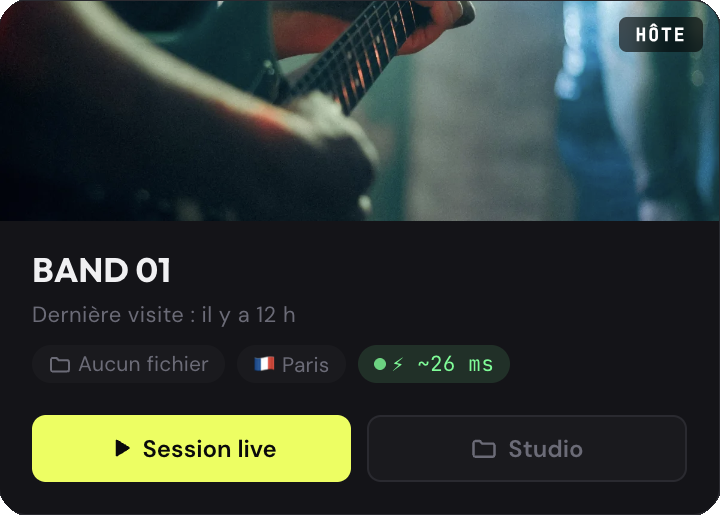
trip to the server (here ~26 ms)

at the bottom of the strip (here 30 ms)
Hover a strip's badge during a session to see its breakdown. On your own strip, it details the outgoing path (what others hear when you play, note→ear) and your local monitoring (what you hear in your own headphones):
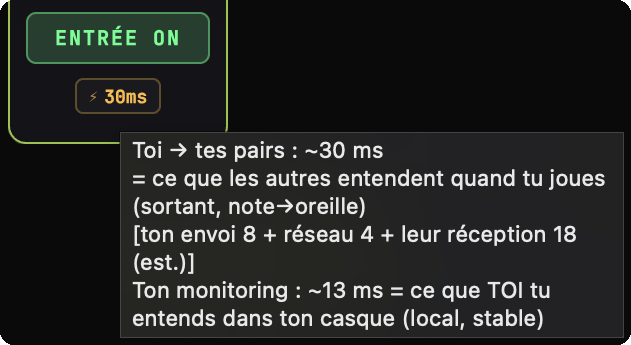
So if you see "26 ms" in My Studios and "37 ms" on your friend's badge inside the studio, it's not an error. They measure different things. The inequality rule: the note→ear value (musician's strip) is always higher than your contribution alone (My Studios badge), because it adds up their chain AND yours.
What each number counts (and what it doesn't)
Both numbers walk the same list of steps. The difference comes down to just two steps:
| Step in the path | note→ear | My Studios badge |
|---|---|---|
| Mic capture | ||
| Encoding | ||
| Audio interface (input) | ||
| Network out (to the server) | ||
| Server relay | ||
| Network back (from server to partner) | ||
| Receive buffer (jitter) | ||
| Decoding | ||
| Audio output | ||
| Headphones |
Surprise: the My Studios badge does include your decoding, your buffer and your headphones — it models your whole audio chain, input and output. The only thing it leaves out is the server relay + the return network trip, the one that depends on where your partner is.
What if there are 3 musicians or more?
Each musician in the studio has their own strip with their own badge. The calculation is redone independently for each one, based on THEIR network distance to our servers + yours. So you don't see an average number: you see the real latency with each musician individually.
Concrete example — you in Paris, in a 3-person session:
| Musician | Their location | Their badge in your mixer | Verdict |
|---|---|---|---|
| Pierre | Paris | ~28 ms | green |
| Paul | Paris | ~28 ms | green |
| Jacques | Toulouse | ~45 ms | orange |
Practical consequence: you instantly know who you can groove with and with whom you'll have to compensate. If Jacques drifts on fast tracks, it's their latency — not their playing.
Note: with a good setup (audio interface + Ethernet, close to the server), two Paris musicians reach green (~28 ms, under 30). The physical note→ear floor in agent mode is around 27 ms (the audio chains of both computers add up): green is reachable, but with little margin — a degraded setup (built-in mic/speakers, Wi-Fi) quickly slips back to yellow or even orange.
Constants vs live measurements: what actually moves?
You might think every number is computed live. The reality is more nuanced:
| Component | How it's obtained | Varies live? |
|---|---|---|
| Network (one-way) | Measured continuously via WebSocket pings to our servers, rolling median over the most recent samples. | Yes, updated every 1.5 s. |
| Jitter buffer (agent) | Read live from the native agent: the adaptive target adjusted in real time based on incoming stream quality. | Yes, updated at 1 Hz. |
| Audio output (browser) | Read live via AudioContext.outputLatency in your browser. |
Yes, real value. |
| Mic capture | Conservative estimate based on the mode (agent or browser). | Constant. |
| Opus encode / decode | Estimate: Opus 20 ms frame ≈ ~2.5 ms encode + ~2.5 ms decode. | Constant. |
| Hardware (USB/TB) | Estimate: ~2 ms typical for USB 2.0 / Thunderbolt. | Constant. |
The 3 values marked "constant" are pessimistic estimates calibrated on the most common setups. Reality may differ by ±5 ms around the displayed number depending on your exact audio interface. But the 3 dynamic values are measured live — they're what makes your badge move when your connection moves.
Going deeper — why not measure everything live?
Measuring capture and hardware in real time would require either a calibration loop at startup (= user friction), or a call to the RTCRtpReceiver.getStats() API every 5 s. The latter adds an asynchronous call cycle to the real-time audio pipeline — which we refuse on principle: no new runtime process should touch the audio path.
The trade-off we picked: pessimistic constants for what's ~stable (capture/opus/hw), live measurements for what actually moves (network, jitter buffer, output). This honest display is worth more than a fake precision.
Wi-Fi vs Ethernet: a myth to debunk
A lot of musicians think Wi-Fi adds latency. That's partially false:
- Wi-Fi doesn't increase the average latency in a healthy environment (~1 ms additional typical vs Ethernet).
- But Wi-Fi massively increases jitter — meaning the variation of latency from one packet to the next.
- Consequence: the adaptive jitter buffer on the receiver side automatically grows (from 10 ms to 30+ ms) to absorb the variations, and that inflation is what shows on the badge.
In short: on good Wi-Fi, your badge can perfectly display the same value as on Ethernet. But as soon as a neighbor fires up Netflix or your access point gets saturated, the badge climbs within seconds — and you start hearing crackles.
For the details, see Ethernet vs Wi-Fi.
Agent mode vs browser mode: why the 40 ms gap?
Jamodio works in two modes:
| Mode | Capture | Opus | Jitter | Output | Audio total |
|---|---|---|---|---|---|
| Native agent (macOS / Windows) | 1-3 ms | 3-7 ms | 8-15 ms | 1-3 ms | ~15-25 ms |
| Browser only | 20-30 ms | 8-15 ms | 15-30 ms | 4-8 ms | ~55-70 ms |
The browser adds 30 to 50 ms of incompressible overhead compared to the native agent. It's not a Jamodio flaw — it's a physical limitation of the browser:
- The browser doesn't expose audio buffers below a certain minimum size, and its WebAudio scheduler stacks on top.
- The browser's WebRTC stack uses an internal jitter buffer configured for telephony voice (high target by default) — not for music.
- Opus encoding goes through the WebRTC stack, which adds its own pacing.
That's why Jamodio ships a downloadable native agent. It fully bypasses the browser stack and talks directly to the OS's low-level audio APIs. Gain: dozens of ms that turn a session from "frustrating" into "enjoyable".
On Windows: why ASIO changes everything
If you're on Windows, there's a technical detail worth understanding — it isn't specific to Jamodio, it applies to every online jam tool (JackTrip, FarPlay, JamKazam, Jamulus…). Windows offers two very different audio paths:
| Audio stack | When it's used | Buffer latency | Who benefits |
|---|---|---|---|
| WASAPI Shared (Windows default) |
All consumer apps — Chrome, Spotify, Zoom, Discord. The Windows sound engine mixes the outputs of every app. | ~10 ms floor | Built-in sound card, onboard jack, HDMI, USB without ASIO driver. |
| ASIO (manufacturer driver) |
Pro music software — Cubase, Ableton, Reaper, FL Studio… and Jamodio's agent when an ASIO driver is installed. | ~2-3 ms | External USB / Thunderbolt audio interfaces (Focusrite, MOTU, Behringer, Steinberg, RME…) with their official driver. |
The difference comes from the Windows sound engine. In WASAPI Shared mode (the default), Windows mixes internally with a fixed 480-sample buffer (= 10 ms at 48 kHz), impossible to go below. It's an OS limitation, not a vendor choice. ASIO completely bypasses this mixer by talking directly to the hardware via the manufacturer's driver.
Every Jamodio competitor recommends ASIO on Windows: it's the standard recipe for online jamming. The good news: it doesn't need a big budget — a Focusrite Scarlett Solo (~$110), a Behringer UMC22 (~$50) or a Steinberg UR22C (~$150) is more than enough, ASIO drivers included by the manufacturer.
For the detailed ASIO driver install procedure (with screenshots), see ASIO on Windows.
The 30 ms threshold — why this value?
You may have noticed that Jamodio badges go from green to yellow at 30 ms. It's not arbitrary: research on networked music performance places the tight-sync zone around 25-30 ms one-way, and shows you still play very well up to ~40 ms by compensating slightly (imperceptibly slowing down). We use 30 ms as the green line: the upper bound of the "same room" zone, genuinely reachable with a good setup.
The Jamodio thresholds (< 30 · 30-40 · ≥ 40):
- < 30 ms = "like being in the same room". The brain doesn't perceive the delay, the groove is intact.
- 30-40 ms = playable, but an experienced musician starts compensating instinctively (slowing slightly). Good results on mid-tempo tracks.
- ≥ 40 ms = perceptible delay. On fast or rhythmic tracks (funk, metal), it becomes uncomfortable. On ballads, still workable.
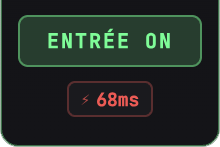
The badge color follows these thresholds — one glance is enough. Example of a badge in the zone to fix:
Going deeper — latency in an actual room
You might think: "OK, 25 ms online, but in a real room we're at 0 ms, right?". No. Sound travels at ~340 m/s through air. Between two musicians 3 meters apart = ~9 ms of natural acoustic latency. On a concert stage with a bass player 10 m from the drummer = ~30 ms. Musicians have been compensating for this forever.
Jamodio at 30 ms one-way ≈ playing with someone ~10 meters away in a room. Totally workable. It's even the norm in 90% of live stage contexts.
Going further
Now that you understand the numbers, the three articles below give you the concrete levers to optimize your latency: